


Sunday, September 24, 2017
Wednesday, August 16, 2017
How To Set Multiple Ringtones Every Time You Get A Call

This Is Simple and Easy Way To Set Multiple Ringtones Every Time You Get On A Call.
Now Install Rand Tune App In Play Store.
Then Simply Follow This Steps..
Open Rand Tune App, Select Play List

Now Click On " + " Button Type Play List Name And " ok "

Again Click "+" Button And Select "Add Folder " ... Now Choose SD Card Ring Tones Folder .

This Is Final Step-- Select Play List And Press "On " Button On Calls.
Now Select Bellow Drop Down Play List .

Now Call You Mobile 2 Or 3 Times Check It's Working Or Not.....
Sunday, June 25, 2017

Tuesday, June 20, 2017
How To Get Samsung Galaxy S8 Look All Android Mobiles

This Launcher Is The Best Launcher To Get Samsung Galaxy s8 Look.
Simply Install This App , Select as a Default Launcher and Modify Home screen, folder icon color, background , theme Etc..,
This Launcher Support Backup Aad Reset Also.
Download Here s8 Launcher Galaxy
Watch Video For More Information
Sunday, May 21, 2017
How To Check Who Visited And Viewed Your WhatsApp Profile 2017

First you can install WhatsTracker app
Simply Select Agree And Conditions.

Now Enter Name,country and mobile number ( Already existing WhatsApp number )
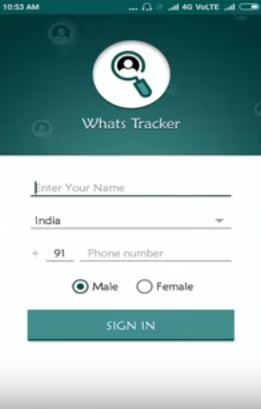
Then Enable App Permissions

Check All Permissions ...

Finally Select Visited and Visitor tabs find who visited and viewed your profile on WhatsApp

Tuesday, May 16, 2017
How To Clear Mobile Phone Cache Date With Out Any Third Party Apps

A Cache is a place to store something temporarily in computing environment. Cache hits are served by reading data from the cache , which is faster than recomputing a result or reading from a slower data store . the more requests can be served from the cache , the faster the system performs .
Simple follow These Steps .....
1. Move On to the Mobile Phone Settings.

2. Then Choose Choose "Storage".

3. Showing All the data storage about your mobile phone. Select "Cache Data".

5. Simple Just press "OK" Button.
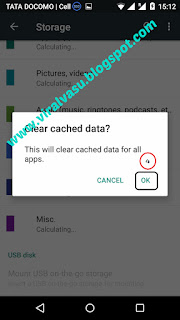
6. Done
Saturday, April 29, 2017
How To Earn Unlimited Money On Adbitly By Sharing Short Urls

Earn Daily Unlimited Money 100% Working With Proof
Click Here And Register With My Referral Link (Get 10% Extra Income)
Procedure:
1.Click Above Referral Link . You Can Also Direct Referral (Use This Link Get 35% Extra Revenue Every Day)
2. Automatically Open Site , Then Move Your Cursor To Top Right Side Corner .

3. Then Click My Account . Register With New Membership Account .

4. Fill Details (Name , Mail id, Phone number) Finally Press Ok.

5. Now You Got a Mail To Your mail id before You Alredy registered.
6. Open your Mail ,Simply Click Activation Link Automatically Activate Your Account.
How To Earn:
1.Simply Copy Any Link And Past Then Click Short Url.
2. Share This Link On Social media (facebook,whatsapp etc.)
Earn Extra Money:
Tip 1:You can earn 100% revenue On Mobile Devices,Tab's.
Tip 2: 85% Revenue On Desktop Or Laptop Or
Withdraws:
Withdraws start Min 3$ TEZ App, Once You Can reach 3$ Press Withdraw Button On Withdraw Section ( Before You Can Full Your Bank details ).
Payment With In 1 Working Day TEZ App only.


Tuesday, November 15, 2016
Best Free Editing Software For Youtube Tutorials
I Support This Software Is Best One For Editing Videos And Adding Special Effects. Simply Follow Below Video Tutorial . Finally Install And Enjoy Your Own Video Editing .

I Support This Software Is Best One For Editing Videos And Adding Special Effects. Simply Follow Below Video Tutorial . Finally Install And Enjoy Your Own Video Editing .
Click Below Download Button

Click Below Download Button .
Watch Demo Video
Saturday, November 12, 2016
How To Download Ration Card Online
Andhra Pradesh State Government Providing To Download Duplicate Ration Card In Online Official Website.

Know Your Ration Card Number :
- Navigate To The Official Website Here
- Then Click Print New Ration Cards.

Then Select Drop Down District Name , Enter Ration Card Number or Application id.
Simply Press Submit Button.
- Then Take Screen Shot (Press PrtSc Button On key Board )
- Then Open MS Paint Simply Press Past .
- Now Crop The Image And Save.
- Done
Don't Know Ration Card Number
- Navigate To The Official Website Here
- Then Click Ration Card Search Based on UID .

- Now Enter UID (Aadhar ) Number Any Person Of The Concerned Family member And Click On Search Button .
- Now Next Page Would Be Display You Details Like Name , Ration Card Number , Lication.
- Now Copy The Ration Card Unique Number.
- The Get Back To Home Page Click On Home Button.
- Navigate To The Official Website Here
- Then Click Print New Ration Cards. Past The Ration Card Number
- Then Take Screen Shot (Press PrtSc Button On key Board )
- Then Open MS Paint Simply Past Here.
- Now Crop The Image And Save.
- Done.
Saturday, November 5, 2016
How To Use Google AdSense Matched Content Ads

Matched Content Is A Free Widget Service That Provide Relevant Content From Your Website. Matched Content Can Help To Increase Your Website Views And Visitors Spend More Time On Your Website.
1. Sign in AdSense Account.
2. Click On New Ad unit
3. Select Native, then Click on Matched Content.
5. Select Style, color, size.
6.Finally Save and get Code.
7.Done.

Watch Demo


